


A good backup power plan starts with a simple question: How long could the power be out, and what do you need to keep running? A 4-hour outage may only require basic essentials, while an 8-hour or 24-hour outage calls for more battery capacity and better energy management. Nature’s Generator offers options for reliable backup power, including a solar power generator, a whole home power generator, and portable backup power for different outage situations.
This guide explains what to run during a 4-hour, 8-hour, or 24-hour outage, how to estimate your power needs, and when a portable system or home-connected setup makes more sense.
What should you include in a backup power plan?
Start by listing the appliances and devices you need most during an outage. You don’t need to power your entire house. In many cases, it is smarter to focus on your essential loads first.
Essential loads
These are the devices you may need to keep running:
- Refrigerator or freezer
- Wi-Fi router and modem
- Basic lighting
- Phones and communication devices
- Medical equipment
- Sump pump
- Well pump
Comfort loads
These are not always essential but can make an outage easier to manage:
-
Fans
-
Television
-
Laptop
-
Coffee maker
-
Microwave
-
Small kitchen appliances
High-power loads
These can use a lot of electricity and may require a larger backup system:
-
Central air conditioning
-
Electric water heater
-
Electric stove
-
Clothes dryer
-
Large power tools
-
Some well pumps
Once you know what you want to run, check the wattage of each device.
A simple estimate is:
Watts × hours used = watt-hours (Wh)
For example, a 100W device running for four hours uses about 400Wh.
Keep in mind that some appliances, like refrigerators, turn on and off throughout the day. Their actual energy use may be lower than their maximum running wattage.
What should you run during a 4-hour outage?
For a 4-hour outage, focus on essential devices and avoid using stored energy unnecessarily.
A basic plan might include a refrigerator, Wi-Fi router, a few LED lights, phone chargers, and a laptop or small fan.
These devices will not necessarily run continuously or at full power.
For a short outage, portable backup power can be a practical option because you can connect only the equipment you need.
The Nature’s Generator Lithium 1800 has 1,800W of output and a 1,440Wh LiFePO4 battery. It can also be charged through solar or wind, depending on the setup.
Real-world example
Imagine a neighborhood loses power for a few hours on a hot afternoon. You may not need to run every appliance. Instead, you could keep the refrigerator, internet connection, phones, lights, and a fan running.
That gives you the essentials without draining your battery on appliances you can live without temporarily.
What do you need for an 8-hour outage?
An 8-hour outage requires more planning because your stored energy has to last longer.
The key is deciding what should stay on, what should only run for short periods, and what should stay off.
A practical plan might look like this:
Keep running: refrigerator, Wi-Fi, essential lights, and medical equipment.
Use occasionally: fan, laptop, television, microwave, or coffee maker.
Avoid unless needed: electric dryer, large electric heater, electric range, and other high-power appliances.
Suppose your average backup load is 400W. Running that load for eight hours would use about 3,200Wh before system losses. At 600W, the same outage would require about 4,800Wh.
This is why battery capacity matters just as much as inverter output.
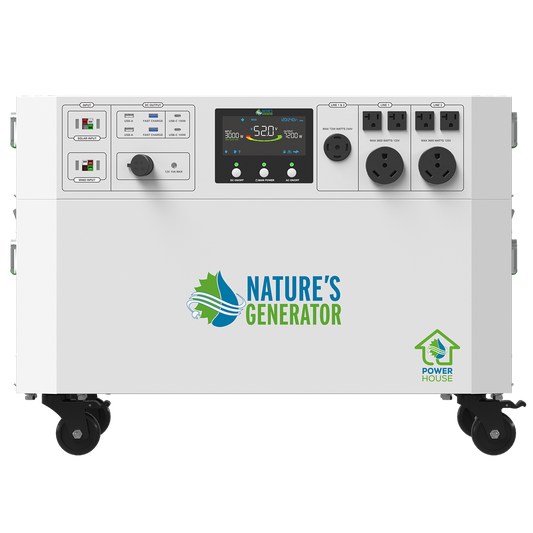
The Nature’s Generator Powerhouse Gen 2 provides up to 7,200W of 120V/240V split-phase output and has a 4,800Wh base battery. Additional Power Pods can be added for more storage.
Real-world example
Consider someone working from home during an 8-hour outage.
Instead of powering the whole house, they might run the refrigerator, Wi-Fi router, laptop, monitor, desk light, and fan.
This keeps food, internet access, and work equipment available while using less stored energy than running larger appliances.
How should you plan for a 24-hour outage?
A 24-hour outage requires a different strategy because you need to manage your energy over an entire day.
The easiest approach is to divide your loads into three groups: must run, use when needed, and leave off.
For example, your refrigerator and internet equipment may need to run throughout the day. A microwave, coffee maker, or fan may only be used for short periods. Large appliances may need to stay off.
If your average load is 300W for 24 hours, you would need about 7,200Wh before system losses.
At an average of 600W, that rises to about 14,400Wh.
This shows why battery capacity becomes much more important during a full-day outage.
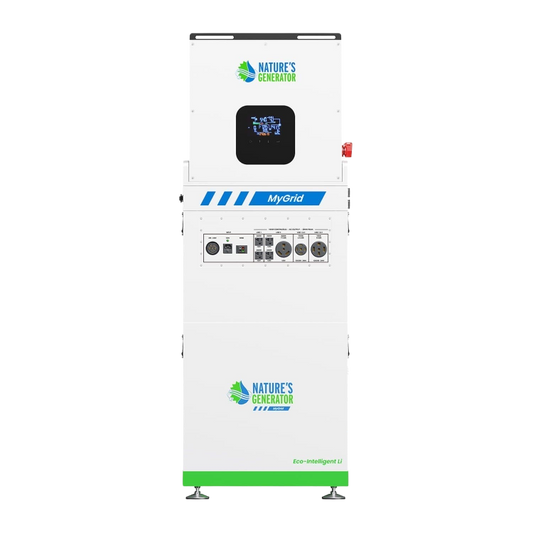
The Nature’s Generator MyGrid 10K has a 10,496Wh LiFePO4 battery and 10,000W of output. It can also be expanded with additional battery capacity and supports solar charging.
However, a 10kWh battery does not automatically provide 24 hours of backup. Runtime depends on your actual load.
Real-world example
Suppose a home loses power overnight.
The battery can support essential loads such as the refrigerator, Wi-Fi, lights, and other critical devices. During the day, solar charging can help replace some of the energy used overnight.
This can be especially useful when an outage lasts longer than expected.
How much battery capacity and output do you need?
You need to look at two numbers: power output and battery capacity.
Power output tells you what you can run at the same time.
Battery capacity tells you how long you can run it.
For example, a system may have enough stored energy to run an appliance for several hours, but its inverter may not have enough output to start that appliance.
This matters with refrigerators, pumps, air conditioners, and other equipment that can briefly draw more power when starting.
Your actual appliances matter more than the size of your home alone.
Is portable backup power enough, or do you need a home-connected system?
Portable backup power works well when you only need a few important devices.
You can connect a refrigerator, router, lights, laptop, or other equipment without changing your home's electrical system. This can be a good fit for shorter outages or anyone who wants a flexible backup option.
A home-connected setup can make more sense when you want backup power delivered to selected circuits.
Instead of moving cords from room to room, a transfer switch can connect your backup system to specific household circuits.
Nature’s Generator offers transfer switch solutions for connecting backup systems to home circuits. Electrical installation should be handled by a qualified electrician.
A manual transfer switch lets you control when backup power is used. An automatic transfer switch can switch to backup power when utility power fails.
The right choice depends on how much power you need, how long the outage may last, and how much of your home you want to support.
Can solar or wind extend backup power?
Yes. Solar or wind charging can help extend runtime during longer outages.
Your battery provides stored energy at the beginning of an outage. Renewable charging can help replace some of the electricity you use.
Different Nature’s Generator systems support different charging capacities. The Lithium 1800 supports solar and wind charging, while larger systems such as the Powerhouse are designed to accept more renewable input.
Actual solar and wind production depends on conditions such as sunlight, weather, system setup, and available charging time.
That means renewable charging should not be treated as an unlimited source of backup power. Instead, think of it as a way to stretch your stored energy.
For a 24-hour outage, for example, you might use battery power overnight, recharge during the day, and save energy for the following night.
How can you make sure your backup system is ready?
A backup system is most useful when you know how to use it before the power goes out.
Before an outage, take these steps:
List your essential appliances. Write down what you really need during an outage.
Check the wattage. Look at appliance labels or manuals and note running and starting power when available.
Estimate runtime. Think about how many hours each device will actually operate.
Decide what stays off. Limiting nonessential loads can make your battery last much longer.
Plan for recharging. For longer outages, consider solar, wind, or another charging source.
Choose your connection method. Portable systems offer flexibility, while transfer switches can provide backup power to selected household circuits.
It is also a good idea to test your setup before an emergency. Make sure you know which devices you can run and how your charging equipment works.
Which backup power plan fits your outage?
The right plan depends on how long the outage lasts and which appliances matter most.
For a 4-hour outage, focus on essentials such as the refrigerator, Wi-Fi, lights, and phones.
For an 8-hour outage, manage your energy more carefully and consider a larger battery if you need to support work equipment, fans, or other comfort loads.
For a 24-hour outage, think beyond battery size. You also need a plan for reducing unnecessary energy use and recharging when possible.
Before buying a system, calculate your actual loads, decide which circuits or devices are essential, and consider whether you need portable flexibility or home integration. Nature’s Generator offers portable and expandable systems for different backup power needs.
The best backup plan is not necessarily the biggest one. It is the one that gives you enough power for the things that matter most, for as long as you need them.


