


When the power goes out, you worry about how long it’ll be off. When it comes back, you probably assume everything is fine.
Not always.
Restoring electricity can come with voltage fluctuations and electrical surges that put sensitive electronics at risk. If the power keeps cutting out and returning, your appliances may face repeated interruptions before things settle down.
If you're looking for reliable backup power, a solar power generator, a whole home power generator, or portable backup power, there's more to consider than keeping the lights on. You also need to think about what happens when the grid returns.
Nature’s Generator offers two whole-home backup options worth comparing: the MyGrid 10K Gen 2 and Powerhouse Gen 2. Here's what causes power problems during grid recovery, how to protect your appliances, and which system might suit your home.
Why can power surges happen when electricity returns?
A power surge is a brief increase in voltage above the level an electrical device is designed to handle. It can occur during utility switching, lightning-related disturbances, or other events affecting the electrical supply.
Not every outage causes a surge when electricity returns. The risk depends on what caused the interruption, the condition of the grid, and the protection installed in your home.
A few problems to watch for include:
-
Utility switching: Reconnecting sections of the grid can create brief voltage transients.
-
Storm damage: Damaged power lines and ongoing repairs can leave the supply unstable.
-
Repeated outages: Frequent interruptions force electronics to shut down and restart.
-
Heavy appliances restarting: Refrigerators, air conditioners, and pumps can draw substantial current when their motors start, potentially contributing to voltage dips.
These issues aren't interchangeable. A surge is a sudden increase in voltage, while a brownout involves reduced voltage. A brief interruption means the supply disappears altogether.
Each issue works differently, so you’ll need a different way to deal with it. Surge protection limits transient overvoltage. A UPS keeps selected devices running through short interruptions. A backup generator supplies electricity when the grid is unavailable.
Depending on your home, you may need all three.
Which smart appliances are at risk when the power returns?
Smart appliances often rely on circuit boards, sensors, and electronic power supplies. These components must operate within specified electrical limits, although some devices have better built-in protection than others.
|
Appliance |
Potential problem |
Protection to consider |
|
Smart TV |
Electronic damage from surges |
Rated surge protector |
|
Router and modem |
Unexpected shutdowns and lost connectivity |
UPS |
|
Desktop computer |
Lost work and interrupted operations |
UPS with surge protection |
|
Refrigerator |
Interrupted cooling and compressor starting demands |
Appropriate electrical protection |
|
Smart thermostat |
Restarts or control issues |
Electrical assessment and surge protection |
|
Security cameras |
Interrupted recording and monitoring |
Battery backup and protected power |
Consider a home office during a summer storm. The power fails, the computer shuts down, and the router disconnects. Electricity returns, but another interruption follows before everything has restarted.
A UPS can help keep computers and network equipment running through brief interruptions, provided its capacity is sufficient. A whole-home backup system can keep your household powered through extended outages.
Refrigerators and air conditioners need a different assessment because their motors can draw significantly more power when starting. A system that runs a laptop comfortably may struggle with those loads.
Start by identifying the appliances you need most. Then work out their power requirements.
How do you protect appliances when the grid comes back on?
The best approach combines surge protection, backup power, and a properly installed electrical system.
Install surge protection
A surge protective device (SPD) at the electrical panel can help limit transient overvoltages entering through the supply. Plug-in surge protectors provide another layer of protection for individual devices.
For valuable electronics, using both may make sense. Keep in mind that not every standard power strip protects your devices from power surges.
Grounding, bonding, and the condition of your electrical panel also matter. Ask a licensed electrician to assess your setup rather than assuming a plug-in device protects everything.
Use a UPS for sensitive electronics
An uninterruptible power supply (UPS) has a built-in battery that kicks in when your regular power supply goes out. Depending on its design, it may also provide voltage regulation and surge protection.
It's useful for computers, routers, network storage, and security equipment that shouldn't shut down whenever the power flickers.
Check the UPS wattage rating, expected runtime, and output compatibility. Don't assume a unit designed for a computer can handle a refrigerator or air conditioner.
Check your backup system's transfer arrangement
A whole-home backup system can power selected circuits during an outage. A transfer switch manages the connection between the utility and the backup source, isolating the two supplies when required.
Automatic transfer equipment can handle the transition without manual intervention when the system is designed for that purpose.
Nature’s Generator explains the role of this equipment in its guide to automatic transfer switches.
One important point: a transfer switch doesn't replace surge protection. It controls where the power comes from, while an SPD helps protect against sudden voltage spikes.
Can a whole-home generator prevent voltage spikes?
Not automatically.
A battery backup system can supply electricity during an outage and may switch between power sources quickly enough to reduce interruptions. But fast switching isn't the same as protection against every surge.
Before buying, check four things:
-
Output quality: Does the system provide pure sine wave power suitable for your appliances?
-
Transfer time: How quickly does it switch, and will sensitive devices tolerate the interruption?
-
Power capacity: Can it handle simultaneous loads and motor starting demands?
-
Battery capacity: How long can it supply those loads before recharging?
A generator might have enough output to run several appliances but not enough stored energy to keep them running through a long outage. Both numbers matter.
MyGrid 10K Gen 2 vs. Powerhouse Gen 2: Which should you choose?
Nature’s Generator offers two systems with different output, storage, and solar charging capabilities. The right choice depends on what you need to power and how long you expect outages to last.
|
Feature |
MyGrid 10K Gen 2 |
Powerhouse Gen 2 |
|
Continuous output |
10,000W |
7,200W |
|
Peak output |
20,000W |
14,400W |
|
Included battery |
10,496Wh |
4,800Wh |
|
Battery chemistry |
LiFePO4 |
AGM lead-acid |
|
Listed maximum expanded capacity |
Up to 73.4kWh |
Up to 28.8kWh |
|
Maximum solar input |
Up to 12,000W |
Up to 2,000W |
|
Published automatic switching time |
Under 20 milliseconds |
Under 20 milliseconds |
|
Published limited warranty |
5 years |
1 year |
When does the MyGrid 10K Gen 2 make more sense?
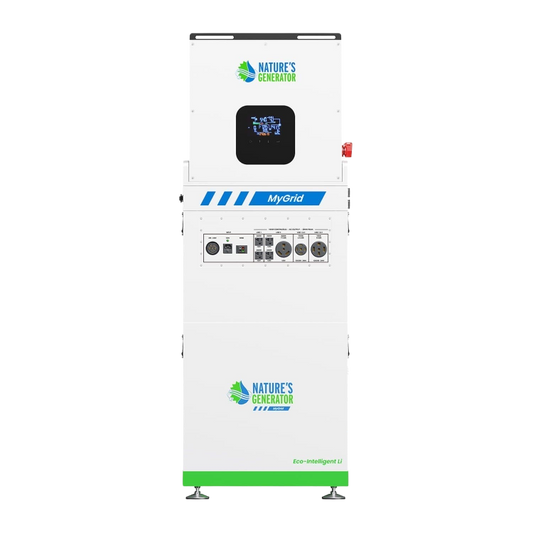
The MyGrid 10K Gen 2 is worth considering if you need more output, greater included battery capacity, or room to expand your solar setup.
Its 10,000W continuous output and 10,496Wh battery provide more capacity than the listed Powerhouse configuration. It also supports solar input up to 12,000W.
For a household running refrigeration, networking equipment, lighting, and a home office during an outage, that extra capacity may be useful. However, you'll still need to calculate the combined load and account for appliances with high starting demands.
Its higher solar input capacity may also suit homeowners planning to recharge using a larger solar array. Actual charging depends on sunlight, panel configuration, and compatibility.
Review the MyGrid 10K Gen 2 whole-home generator for specifications and configurations.
When is the Powerhouse Gen 2 a better fit?
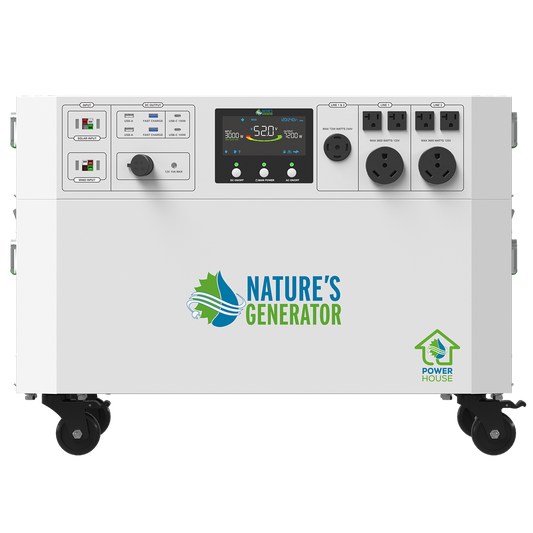
The Powerhouse Gen 2 may suit households that want to keep essential appliances running rather than power every circuit.
It provides 7,200W of continuous output, 4,800Wh of included AGM battery capacity, and solar input up to 2,000W.
For example, you might prioritise the refrigerator, router, selected lights, and essential electronics. If those loads fit within its output and runtime limits, you may not need a larger system.
Compatible Power Pods allow battery expansion, with the manufacturer listing up to 28.8kWh using five Power Pods. Additional storage increases the system's cost and space requirements.
AGM and LiFePO4 batteries also differ in charging requirements, usable capacity, and expected service life. Consider these factors when comparing long-term ownership costs.
Check the Powerhouse Gen 2 product page to see whether it matches your needs.
Which generator is safer for smart appliances?
Neither system should be treated as a guarantee against every electrical disturbance.
Both publish pure sine wave output and automatic switching under 20 milliseconds. Those are useful specifications, but they don't guarantee that every appliance will remain on during a transfer or that every grid surge will be stopped.
Sensitive electronics may still benefit from a dedicated UPS and suitable surge protection.
Choose the MyGrid if you need higher output, more included battery storage, and greater solar input. Consider the Powerhouse if its capacity comfortably covers your essential circuits.
How do you prepare your home before the next outage?
A little planning now can save you from discovering that your backup system can't run the refrigerator when you need it.
1. List your essential appliances. Record their running wattage and, where relevant, starting wattage. Decide which appliances need to operate simultaneously.
2. Estimate runtime. A device drawing an average of 100W for 10 hours uses 1,000Wh, or 1kWh. Appliances averaging 800W over five hours use 4kWh. Actual runtime will be lower after conversion losses and other operating factors.
3. Check your electrical installation. Ask a licensed electrician to assess your panel, grounding, surge protection, and transfer equipment. Confirm which circuits will receive backup power.
4. Test your equipment. Follow the manufacturer's instructions for charging and maintenance. Check UPS batteries and make sure your backup system is ready before an outage occurs.
If you already have rooftop solar, confirm compatibility before adding backup equipment. Standard grid-tied solar systems generally shut down during a grid outage unless configured for safe backup operation.
What should you look for in customer reviews?
Customer feedback can help you understand everyday performance, but a review is only useful if the customer's setup resembles yours.
When comparing the MyGrid 10K Gen 2 and Powerhouse Gen 2, look for details about:
-
Runtime: Which appliances were powered, and for how long?
-
Switching: Did computers or routers restart during power transitions?
-
Recharging: How practical was solar charging in the customer's setup?
-
Installation: Were additional electrical components or professional installation required?
-
Support: How were technical questions and warranty issues handled?
One homeowner may be satisfied with a system that runs a refrigerator and router. Another may need to power multiple circuits and a home office for several hours.
I haven't included unverified customer quotes or ratings. Check the product pages for current reviews, especially from customers with similar power requirements.
Is a whole-home generator enough to protect your appliances?
Not by itself. A backup generator supplies electricity during an outage. A UPS keeps selected electronics running through brief interruptions. Surge protection helps limit transient overvoltage, while correct wiring and transfer equipment help manage power safely.
For homeowners who need higher output, more included battery storage, and greater solar charging capacity, the MyGrid 10K Gen 2 is worth considering. If you're powering essential appliances and the Powerhouse Gen 2 meets your calculated loads, it may be sufficient.


