


When the power goes out, a big battery sounds great. Until you start asking the practical questions. How long will it keep your refrigerator running? Can it recharge when the weather turns bad? And what happens when you want to power your home without relying on the utility at all?
Those questions matter when you're shopping for reliable backup power, a solar power generator, a whole home power generator, or even portable backup power for specific situations.
Nature's Generator MyGrid 10K Gen 2 and Tesla Powerwall 3 both store electricity for home use, but they're built around different priorities. One is designed for off-grid applications and flexible charging. The other focuses on solar energy storage and backup within a grid-connected home.
Let's compare their actual capabilities, the trade-offs that come with each system, and what to consider before spending money on either one.
What's the real difference between MyGrid 10K Gen 2 and Tesla Powerwall 3?
It comes down to how you want your home to get electricity.
MyGrid 10K Gen 2 is designed for both grid-connected and off-grid applications. It can charge from solar, wind, AC power, and an external fuel-powered generator. That flexibility gives homeowners more ways to keep energy flowing when conditions aren't ideal.
Tesla Powerwall 3 is a residential battery system built around solar and the utility grid. It stores electricity for later use, can help reduce reliance on grid power, and provides backup during outages when installed with the necessary equipment.
There's an important distinction here. Powerwall can disconnect from the utility temporarily, but Tesla doesn't support it as a permanently off-grid system. MyGrid, on the other hand, is marketed for off-grid use.
That doesn't automatically make MyGrid the better choice for every household. A home with dependable utility service might have no reason to invest in a setup designed for long periods without the grid. But if you're building on rural land or want more control over where your electricity comes from, the difference matters.
The right starting point isn't the brand. It's how you expect to use the system.
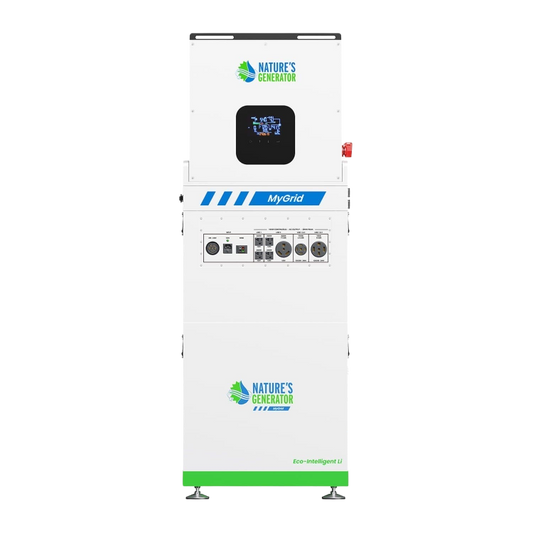
How do the two systems compare on battery capacity and power output?
Both systems can support substantial household loads, but they don't offer the same combination of storage and output.
|
Feature |
MyGrid 10K Gen 2 |
Tesla Powerwall 3 |
|
Rated battery capacity |
10.496 kWh |
13.5 kWh |
|
Continuous power output |
10,000 W |
11,500 W |
|
Listed peak output |
20,000 W |
Check configuration-specific technical documentation |
|
Battery chemistry |
Lithium iron phosphate (LiFePO4) |
See Tesla's current technical documentation |
|
Solar integration |
Up to 12,000 W solar input; AC coupling support for compatible setups |
Integrated solar inverter with six MPPT inputs |
|
Charging options |
Solar, wind, AC, and external fuel generator |
Solar and grid-connected energy management |
|
Battery expansion |
Up to 73.4 kWh, as specified by Nature's Generator |
Additional Powerwall 3 Expansion units |
|
Published warranty |
Five-year limited warranty |
Ten years |
Specifications and expansion limits depend on the applicable model and configuration. Confirm usable energy, charging limits, output ratings, and warranty coverage with each manufacturer before making a purchase.
Powerwall 3 has the larger battery out of the box: 13.5 kWh compared with MyGrid's 10.496 kWh. It also has a higher stated continuous output.
MyGrid's appeal is different. It delivers 10 kW of continuous power and supports several charging sources, with expansion available for households that need more stored energy.
Keep two numbers in mind when comparing them: kilowatt-hours (kWh) tell you how much energy a battery stores, while kilowatts (kW) tell you how much power it can deliver at a given moment. A larger battery won't necessarily handle every appliance, and a powerful inverter won't keep your home running for long if there's not enough energy stored.
See the MyGrid 10K Gen 2 product details and Tesla's Powerwall guide for manufacturer specifications.
Can MyGrid 10K Gen 2 keep a home running without the grid?
That’s a big reason why it’s worth looking into.
MyGrid is designed for off-grid use, and its multiple charging options give homeowners some flexibility when solar production falls short. You can build a setup around solar panels, add battery capacity as needed, and use supported alternative charging sources when conditions call for them.
Imagine living outside the city with a fridge, lights, internet, a water pump, and a few other things you need every day. Solar panels charge the battery during the day. After sunset, the battery supplies the home. If several cloudy days cut production, a compatible external generator or another supported charging source can help replenish the stored energy.
That setup offers more options than a battery that depends on a single charging arrangement.
Still, off-grid capability doesn't mean unlimited electricity. Start with your actual consumption. If your household uses 15 kWh a day, a 10.496 kWh battery won't cover a full day at that usage level without additional generation. You'll need to account for conversion losses, reserve capacity, and the energy you use while the system is recharging.
High-demand appliances complicate things further. Appliances like AC units, electric water heaters, ovens, pumps, and EV chargers can put a pretty big dent in your power supply. Running several together may exceed your available output or drain the battery much faster than expected.
Before committing to an off-grid setup, work out your daily energy use, likely peak demand, solar production, and storage requirements. A qualified installer should also confirm the proper electrical connections, transfer equipment, and local code requirements.
Can Tesla Powerwall 3 operate without utility power?
Yes, temporarily. But don't confuse that with a supported permanent off-grid installation.
Powerwall 3 stores electricity from solar and the grid, then supplies it when needed. With the appropriate backup configuration, it can automatically provide power during a utility outage.
Tesla also offers a Go Off-Grid feature in its app for eligible systems. It lets owners disconnect from the utility and operate on available stored energy and solar production. However, Tesla explains that the system may reconnect if the battery runs out or demand exceeds what it can supply.
In other words, you can test how your home performs without utility power while keeping the grid connection in place. That's useful for understanding energy consumption and preparing for outages.
But Tesla does not support Powerwall 3 as a permanently fully off-grid installation. If you're planning a property with no utility connection, that's a major point to settle before comparing battery capacity, app features, or warranty terms.
For most grid-connected households, Powerwall's approach makes sense. You keep your normal utility connection, store solar energy for later, and have backup when the grid fails. You don't have to design the entire property around energy independence.
Which system gives you more flexibility with solar and other charging sources?
MyGrid has the edge when charging flexibility is a priority.
It supports solar, wind, AC power, and an external fuel-powered generator. That gives off-grid homeowners alternatives when sunlight isn't enough to keep up with demand.
It also supports AC coupling for compatible solar setups. If you already have rooftop solar, that may provide a way to incorporate energy storage without replacing every existing component. But compatibility isn't automatic. Your current inverter, wiring, electrical configuration, and local requirements all need to be checked.
Powerwall 3 takes a more integrated approach. Its built-in solar inverter can simplify a compatible solar-and-storage installation, and its app lets owners monitor energy production, consumption, and battery operation.
It can also help households shift their electricity use. For example, a home with time-of-use rates may store excess solar energy during the day and use it during the more expensive evening period. Depending on the utility plan and system settings, that can reduce the amount of electricity purchased at peak prices.
Both systems can help homeowners make better use of stored electricity. The difference is how much flexibility you need beyond solar and grid power.
If you already have a working solar installation, get the system checked before assuming either battery will integrate smoothly. If you're starting from scratch, compare the complete installed systems rather than the battery units alone.
Which system makes more sense during a long power outage?
A short outage is relatively easy to plan for. A multiday outage is where the details start to matter.
If you need the basics to keep running all night
Both systems can be suitable candidates for backup, provided the installation supports the circuits you need.
That means keeping the fridge cold, the lights on, the internet running, phones charged, and a few outlets usable Add up their expected energy use, not just their wattage at one moment. That's how you'll estimate how long the battery might last.
If you expect several cloudy days
MyGrid's support for multiple charging sources can be useful when solar production drops. A compatible external generator, for example, may give you another way to recharge.
With Powerwall, you’ll have to keep an eye on how much power you have left and what your household is using. A larger starting battery helps, but it doesn't replace ongoing generation during a prolonged outage.
Neither system can promise uninterrupted power regardless of conditions. The result depends on your stored energy, actual loads, available charging, and installation.
If you want to power a rural property
MyGrid is the more natural system to investigate because it's designed for off-grid applications. You'll still need enough solar generation and storage for your needs, along with a realistic plan for bad weather and unusually high consumption.
Powerwall 3 is better suited to a property that retains utility service and wants integrated energy storage with backup protection.
How should you choose between MyGrid 10K Gen 2 and Tesla Powerwall 3?
Start with what you need the system to do when the grid isn't available.
Consider MyGrid 10K Gen 2 if you want an off-grid-capable system, multiple charging options, substantial continuous output, and room to expand battery storage. It's worth evaluating for rural homes, properties with unreliable utility service, and households that want to work toward greater energy independence.
Consider Tesla Powerwall 3 if your home will remain connected to the utility and you want integrated solar storage, app-based energy monitoring, and automatic outage backup. Its 13.5 kWh base capacity and ten-year warranty are also worth weighing against the full price of the installation.
Before choosing either system, get answers to five practical questions:
-
How much electricity does your household use on a normal day?
-
Which appliances must run together, and how much power do they need at startup?
-
How many hours or days should the battery cover your home?
-
Can your solar array recharge the battery fast enough, especially during poor weather?
-
What will the complete installation cost, including electrical work and any extra equipment?
Those answers will tell you more than a headline battery rating ever could.
Do you want energy independence or better backup?
If you want to store solar electricity and keep your home running through ordinary utility outages, Tesla Powerwall 3 is worth considering. It offers an integrated approach for grid-connected homes, but it isn't supported as a permanent off-grid system.
Nature's Generator MyGrid 10K Gen 2 deserves a closer look if your plans include operating without the utility, charging from multiple sources, or expanding storage as your needs change. Its 10 kW continuous output and off-grid positioning make it a relevant option for that goal.
Neither battery will solve every energy problem on its own. The system still needs enough generation, storage, and output for your home, plus a workable plan for extended periods of low solar production.
Choose based on the way you actually use electricity and what you need the system to do when conditions aren't ideal. That's how you end up with backup power that works for your home, rather than a battery that simply looks good on paper.


